
BlitzCharge™ 45WUpdated 22 days ago
How to install and use your BlitzCharge 45W Car Charger: specs, charging speeds, safety and troubleshooting.
Part 1
Meet your BlitzCharge™ 45W Car Charger
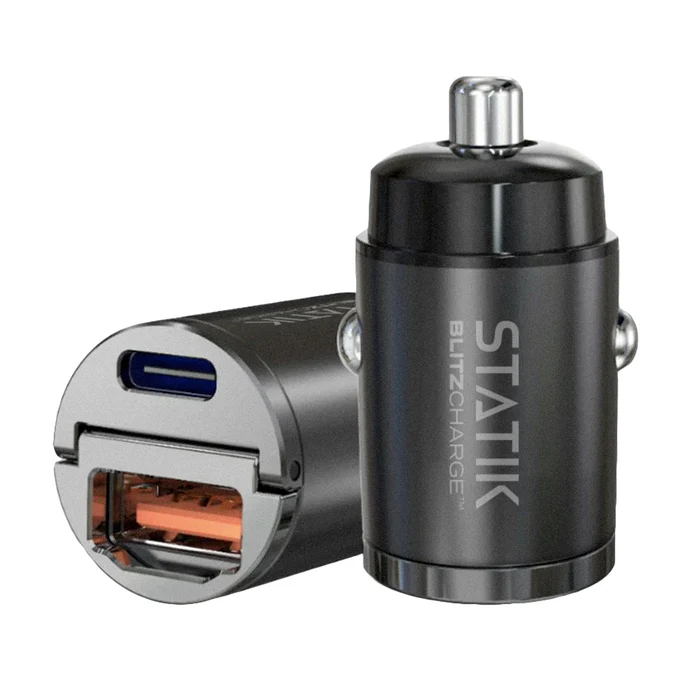
BlitzCharge 45W turns your car's 12V socket (cigarette lighter) into a fast USB-C and USB-A charger. It sits almost flush with the socket, so it stays clear of your gear shift and your hand.
- 45W Max
- USB-C + USB-A
- 12–24V
- Flush fit
- Spec
- Detail
- Ports
- 1x USB-C, 1x USB-A
- USB-C on its own
- Up to 45W
- USB-A on its own
- Up to 45W
- Both ports at once
- 24W max, shared
- Input
- 12–24V DC (cars and trucks)
- Smart chip
- Power Delivery (PD) and Quick Charge (QC) detection sends each device the right power
- Size
- 0.81 × 0.81 × 1.55 in
- Weight
- 0.05 lb
- In the box
- 1x BlitzCharge 45W Car Charger (cable not included)
Part 2
Getting started
- Remove the cap or lighter from your car's 12V socket.
- Push the charger straight into the socket until it seats fully.
- Turn on the ignition. Most cars only power the socket while the car is on.
- Plug your charging cable into the USB-C or USB-A port and connect your phone.
- Check that your phone shows it is charging.
Part 3
Charging and compatibility
The smart chip detects each device and only sends the power it asks for.
- Setup
- What to expect
- One phone on USB-C
- Fast charging at your phone's own max speed (iPhone, Samsung Galaxy, Google Pixel and other USB-C PD phones)
- One phone on USB-A
- Fast charging for Quick Charge phones; standard speed for others
- Two devices at once
- 24W total, shared between both ports
- Tablets, GPS, dash cams, cameras
- Supported over USB-C or USB-A at the device's own speed
- Vehicles
- All cars and trucks with a 12V or 24V accessory socket
Part 4
Care and safety
Keep the socket clean.
Check the socket for coins, crumbs or debris before plugging in.
Do not force it.
If it will not go in, check the socket is a standard 12V/24V accessory socket and that it is clear.
Parked for days?
If your car keeps the socket powered with the engine off, unplug the charger when you park for several days.
Warm is normal, hot is not.
It can feel warm during fast charging. If it becomes too hot to touch, unplug it and let it cool.
Part 5
Troubleshooting and FAQ
- Problem
- Try this
- Not charging
- Turn the ignition on. Push the charger fully into the socket. Try the other port and another cable. If nothing works, check your car's fuse for the accessory socket.
- Charger feels loose
- Push it in until it seats. Some sockets are worn or oversized; try another socket in the car if you have one.
- Charging slower than expected
- Use the USB-C port on its own with a USB-C cable. Both ports together share 24W.
- Phone charges and stops
- Usually a loose fit or a worn cable. Reseat the charger and try another cable.
Will it drain my car battery?
Most cars cut power to the socket when the engine is off, so it won't. If your socket stays powered, unplug the charger when parking for several days.
Can I charge two devices at once?
Yes. Use both ports. They share 24W between them.
Does it work in trucks?
Yes. It works with 12V and 24V sockets.
Questions about your BlitzCharge™ 45W Car Charger? Contact our support team. Covered by our 2-year warranty: warranty details.