
20W GaN Power AdapterUpdated 23 days ago
How to set up and use your 20W GaN Power Adapter: specs, charging speeds, safety and troubleshooting.
Part 1
Meet your 20W GaN Power Adapter
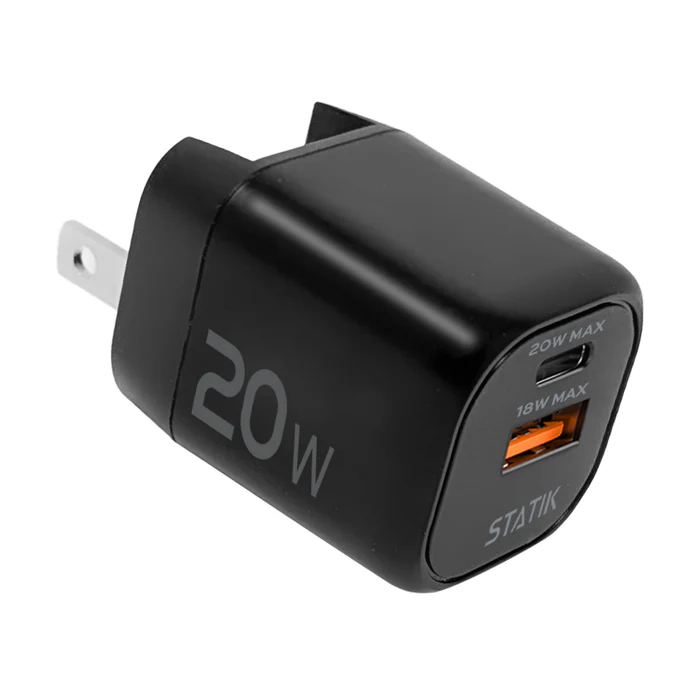
The 20W GaN Power Adapter is a pocket-sized wall charger with one USB-C and one USB-A port. GaN (gallium nitride) parts let it charge faster and run cooler than a standard adapter its size.
- 20W Max
- USB-C + USB-A
- 100–240V
- 0.105 lb
- Spec
- Detail
- Ports
- 1x USB-C, 1x USB-A
- Max power
- 20W
- USB-C on its own
- Up to 20W (12V / 1.67A)
- USB-A on its own
- Up to 18W (12V / 1.5A)
- Both ports at once
- 15W max, shared
- Input
- 100–240V ~ 50/60Hz, 1.8A
- Size
- 1.61 × 1.21 × 1.24 in
- Weight
- 0.105 lb
- Protection
- Overheat, overcharge and short-circuit protection
- In the box
- 1x 20W GaN Power Adapter (cable not included)
Part 2
Getting started
- Extend the plug prongs from the body of the adapter.
- Plug the adapter into a wall outlet.
- Plug your charging cable into the USB-C or USB-A port.
- Connect your device and check that it shows it is charging.
Part 3
Charging and compatibility
The adapter only sends as much power as your device asks for, so it is safe for phones, earbuds and tablets.
- Setup
- What to expect
- One device on USB-C
- Up to 20W fast charging for iPhone 8 and later (with a USB-C cable), Samsung Galaxy and other USB-C PD phones, and tablets
- One device on USB-A
- Up to 18W
- Two devices at once
- 15W total, shared between both ports, so each device charges more slowly
- Earbuds, watches, small gadgets
- Charge normally at their own lower speed
- Laptops
- Most laptops need more than 20W. A USB-C laptop may charge slowly or only while asleep. For laptops, use the 48W GaN Power Adapter or higher
Part 4
Care and safety
Indoors and dry.
Use it indoors, away from water, sinks and damp rooms. Never touch it with wet hands.
Give it air.
Do not cover it with pillows, blankets or clothing while it is charging.
Warm is normal, hot is not.
The adapter can feel warm during fast charging. If it becomes too hot to hold, unplug it and let it cool.
Unplug by the body.
Pull the adapter itself, not the cable, when you unplug it from the wall.
Pack it flat.
Retract the prongs before putting the adapter in a bag or pocket.
Part 5
Troubleshooting and FAQ
- Problem
- Try this
- Device not charging
- Reseat the cable at both ends. Try the other port, another cable and another outlet.
- Charging slower than expected
- Use the USB-C port with a USB-C cable, and unplug the second device. Both ports together share 15W.
- Adapter feels very hot
- Unplug it, let it cool and make sure it is not covered. If it keeps happening, contact support.
- Laptop not charging
- 20W is below what most laptops need. Use a higher-wattage USB-C PD charger.
Does it come with a charging cable?
No. It works with your existing USB-C or USB-A cables, or pair it with a Statik 360 cable.
Is it safe to leave plugged into the wall?
Yes. Built-in protection guards against overheating, overcharging and short circuits.
What is GaN?
Gallium nitride. It lets a charger be smaller, more efficient and cooler-running than traditional silicon chargers.
Questions about your 20W GaN Power Adapter? Contact our support team. Covered by our 2-year warranty: warranty details.